
Tell me if you’ve heard this one before. You build a bunch of new VMs for your lab environment. You have them all running but every time you switch back to a VM you find that it’s always locked and you have to press Control-Alt-Delete and enter your password. In a production environment, this is a great behavior but in a home lab it is maddening. I finally sat down to try and fix this and it turns out it seems pretty simple. Simply add the following two lines to your deployment script:
powercfg -change -monitor-timeout-ac 0
powercfg -change -standby-timeout-ac 0
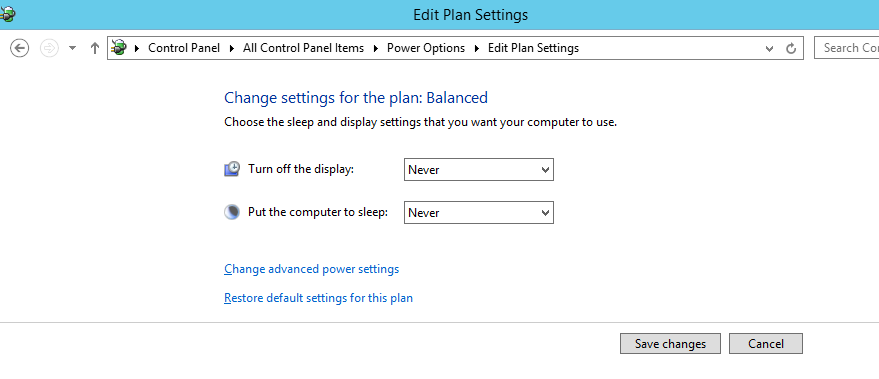
What these commands do is change the following two properties (Turn off the display and Put the computer to sleep) for the currently active PowerPlan and sets them to Never.


1 comments
Tom Pettersson gÃ¥r direkt in i startelvan i U21 matchen ikväll mot Rumänien. Mange sitter pÃ¥ bänken. De du! GuessSveriges startelva: 1 Karl-Johan Johnsson – 2 Miiko Albornoz, 3 Joseph Baffo, 4 Tom Pettersson, 5 Erdin Demir – 6 Jiloan Hamad (K), 7 Oscar Lewicki, 8 Astrit Ajdarevic, 9 Oscar Hiljemark – 10 Mikael Ishak, 11 Mervan Celik.Ersättare: 12 David Nilsson – 13 Richard Magyar, 14 Joel Allansson, 15 Jakob Johansson, 16 Niklas Hult, 17 Viktor Claesson, 18 Rasmus Jönsson, 19 Magnus Eriksson.Matchen direktsänds i TV4 Sport ExtraLycka till Tom och Mange!!!